

How to Change Domain Settings
DomainsLearn how to update the settings for a domain
You can edit a domain after adding it to AccuRanker. This allows you to update how the domain is organized and how its rankings and search data are configured, without having to set it up again.
How to Edit Your Domain Settings
To update an existing domain:
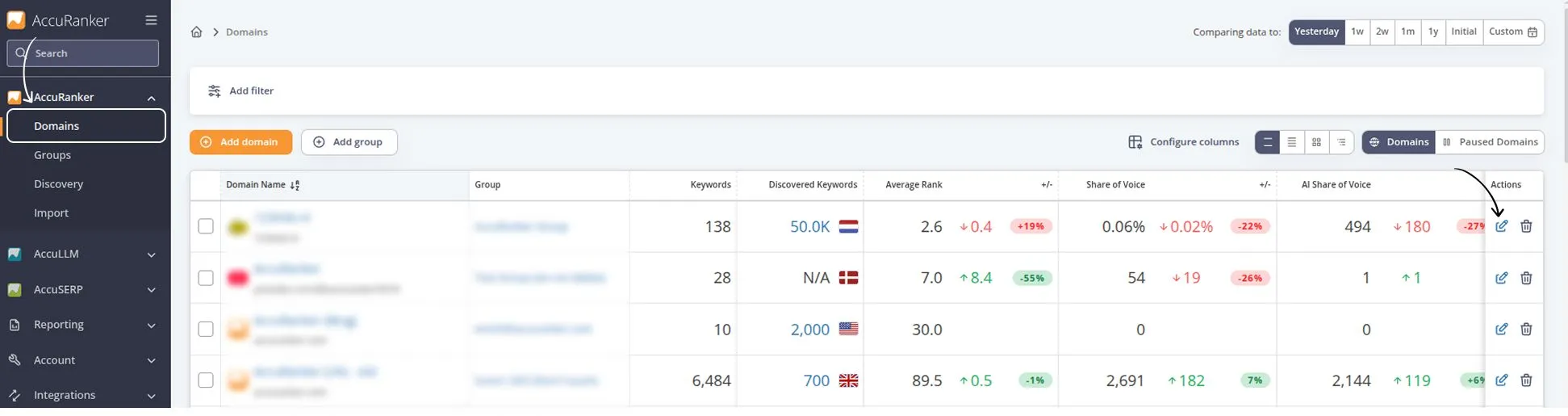
- Go to Domains in the sidebar.
- Find the domain you want to update.
- Click the Edit icon in the Actions column and update the settings for that domain next to the domain.
Which Domain Settings Can You Change?
The available settings cover your domain information, account organization, and how AccuRanker handles different types of ranking and search data.
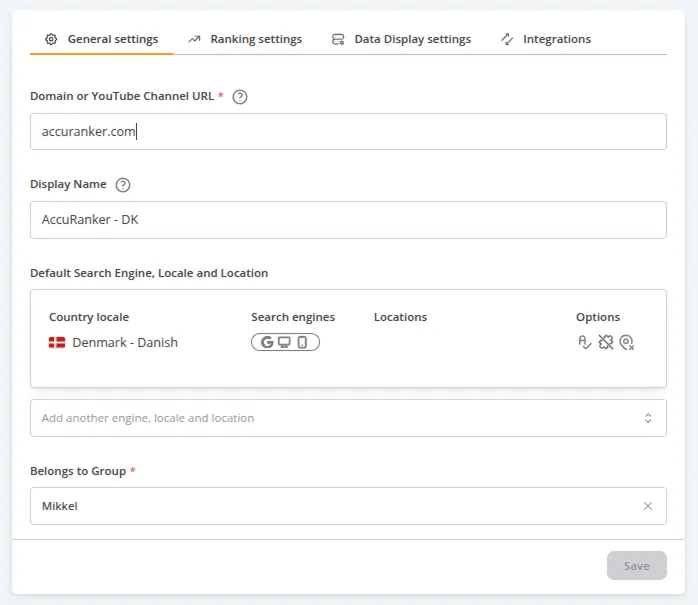
Domain and Account settings
You can change your Domain name and Display name if you need to update how the domain is configured or displayed in AccuRanker.
You can also change the Group the domain belongs to. This is useful when you reorganize your account or need to move a domain between groups.
The Default search locale determines the default locale shown in the Add keywords box when adding new keywords to the domain. Changing this will not affect existing keywords.
Subdomain and Exact Match settings
Under the advanced settings, you can configure Include subdomains and Exact match. Enable Include subdomains when you want rankings from subdomains to be included when AccuRanker tracks the main domain. If you want to understand when to use this setting, see How to Include Subdomains.
Use Exact match when you want AccuRanker to apply exact matching to the domain you are tracking. When enabled, you will only rank on results where the detected URL exactly matches the entered domain. For example, if your domain is example.com, results for subpages such as example.com/blog will be excluded.
Google Business and social media
You can add or update the Google Business name(s) associated with the domain. You can also use Link social media to manage the social media accounts connected to the domain.
Search Volume, CPC, and Average Rank settings
You can also change settings that affect how AccuRanker handles and displays your keyword data: Search volume settings control the search volume configuration for the domain. CPC Currency determines the currency used for CPC data. Average Rank settings let you configure the Average Rank settings for the domain.
Related help guides
How to Add Domains
How to Move a Domain to a Different Group
How to Include Subdomains
Still need help?
Customer support
Our live support team is ready to assist you with any issues.