Release Log
Latest updates in AccuRankerCustomer Input
Update to the LLM Competitor Tab
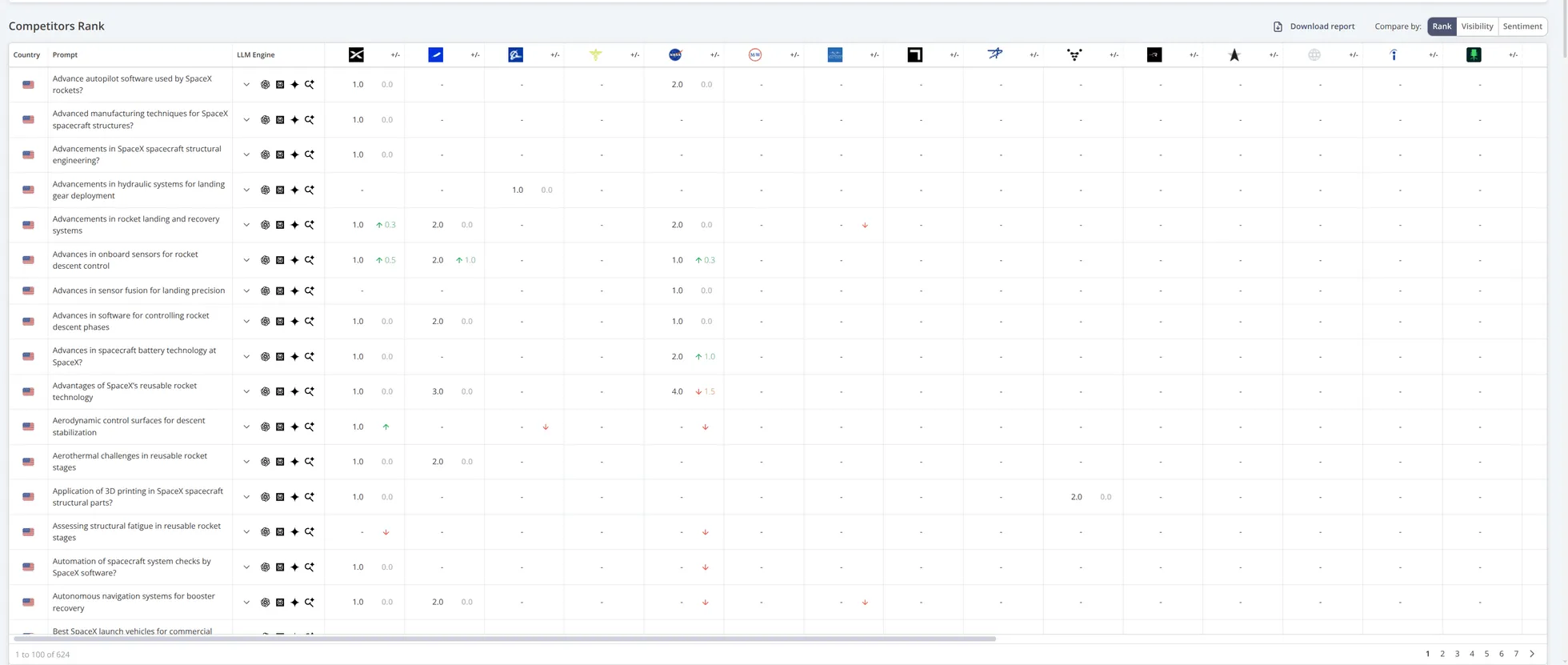
We have added a table to the LLM Competitor tab. You can now track how your brand's rank, visibility, and sentiment compare with those of your LLM competitors across prompts, with all the sorting and filtering options you know and love.
You can also export the data as an Excel, CSV, or Google Sheets report.
Customer Input
New Features & Improvements
We have enabled three new features.
1. Bulk paste Google Business Names
You can now add multiple Google Business Names, tags, or brand spellings to a domain in one go. We have replaced the single input field with a multi-line text area that supports comma-separated values or one value per line. This makes bulk setup faster and much easier.
2. Clearer behaviour for Default settings
We have clarified how Default Search Engine, Locale, and Location work on the domain settings page. The warning "Changes to default settings do not affect existing tracked keywords" is now shown when editing these settings to make this explicit. No more uncertainty about how defaults impact your data.
3. Updated SERP View tool
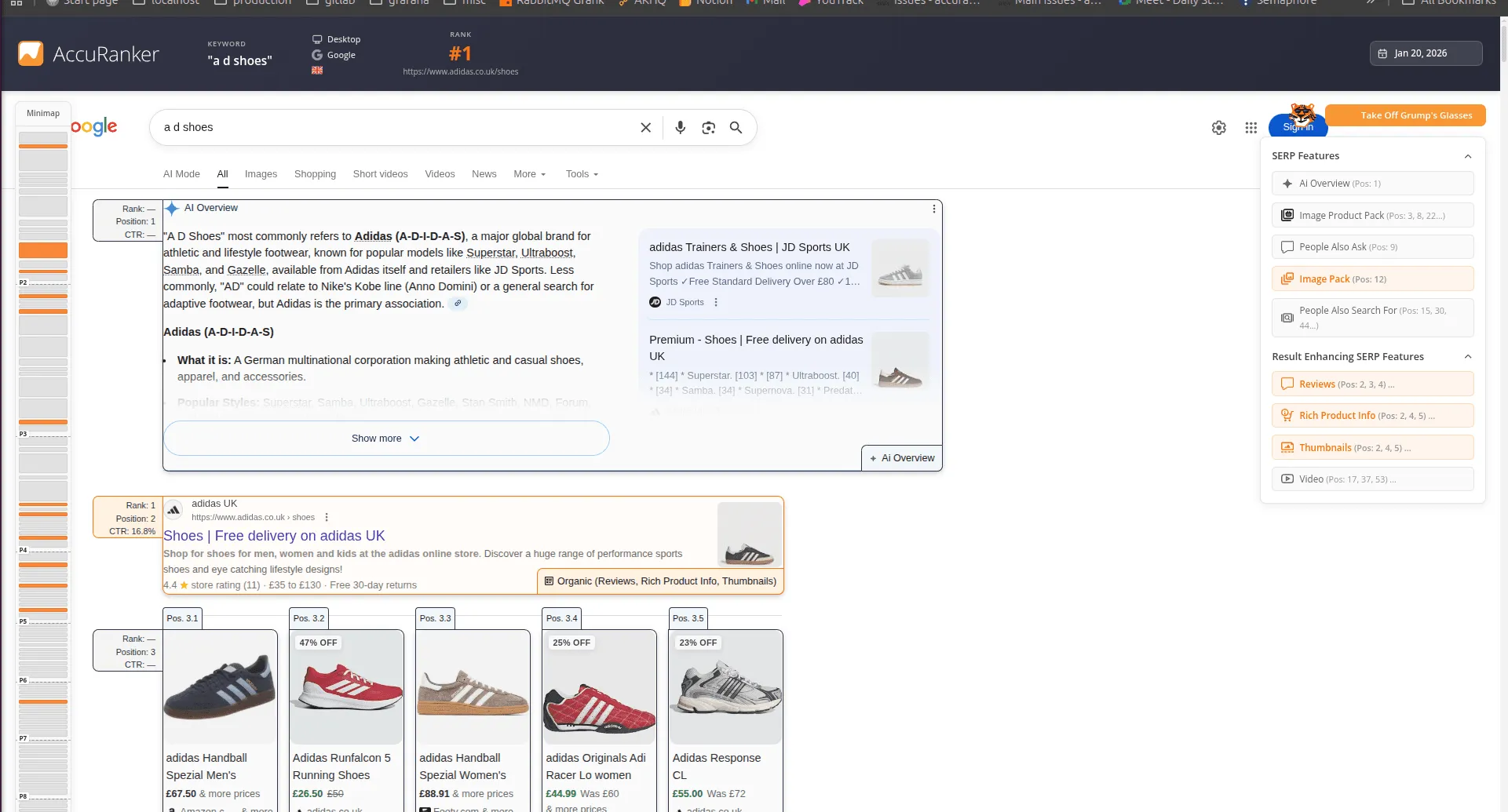
We have introduced a new full SERP view directly in the app, giving you a faster overview to understand what we track and how ranking is counted. With the new SERP View, you can:
- See the position of all SERP elements
- View the rank of each SERP feature
- Identify the type of each SERP feature
- See enhancing features for each SERP feature
- Explore sub-elements where applicable.
Click the magnifying glass in the Keyword list or Keyword history modal to open the SERP View and explore.
Customer Input
New AccuLLM Prompt History and Report Downloads
We have enhanced Prompt History to make reviewing past prompts faster, clearer, and easier to share.
Prompt History Modal
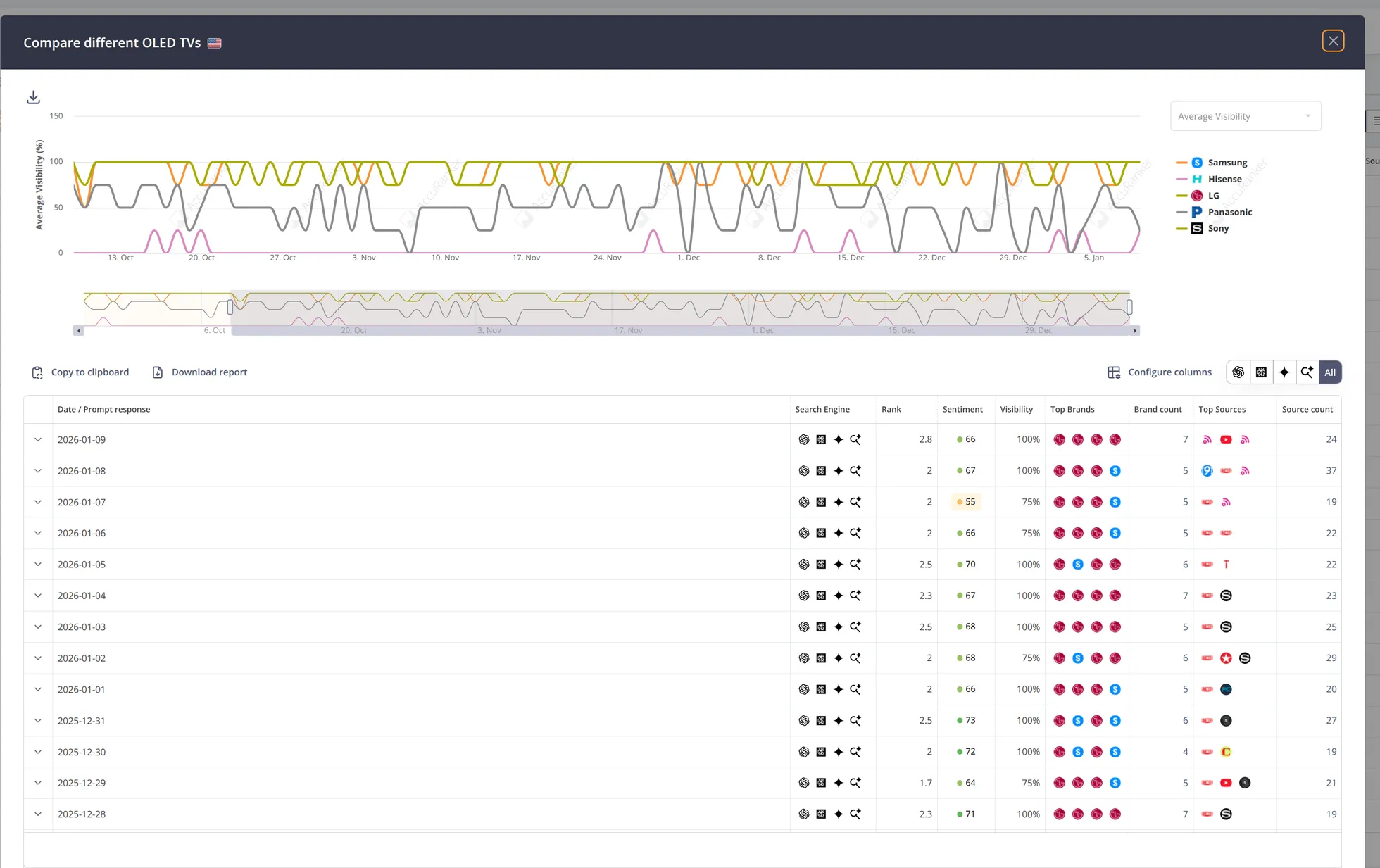
A new prompt history modal is now available, aligned with what you know from the keyword history modal.
Get a quick access by clicking the prompt in the prompts table. You can now view changes in table format, day by day, for a single prompt, without complex navigation.
Download Prompt History Reports
Prompt History data can now be exported directly from the Prompt History view, for easier reporting and comparisons over time.
Customer Input
Extra Rank Details in Keyword Tables
The keyword table now displays additional rank rows, providing deeper visibility into SERP performance.
More detailed rank information than before, including:
- Click-through rate (CTR)
- Pixels from the top of the page
- SERP features associated with the specific SERP element.
Customer Input
AccuLLM Expanded Metrics
Several new AccuLLM metrics available across the product, providing greater visibility and consistency between the UI and API.
Dashboard
- Top Proximity Score KPI and widget: Measures how early a brand appears in prompt responses, earlier mentions score higher.
Tables
New columns can now be added via Configure Columns, enabling richer competitor statistics on both prompt table and competitor table.
- Prompt table: Top Proximity Score (TPS), Web Search Rate, and Mentions.
- Competitor table: Top Proximity Score, Mentions, Citations, Share of Mentions, and Share of Citations.
API Enhancements
The same metrics are now exposed via the API for deeper analysis and automation.
- API Brands (history):
average_top_proximity_score,average_web_search_rate,brand_mentions - API Prompts (results -> brands):
brand_name_start_indexes,top_proximity_score,web_search_rate
Customer Input
AccuLLM Improvements
This release brings several improvements to AccuLLM to expand insights and flexibility:
Three new KPIs and widgets
1. Share of Citations: Measures the percentage of citations owned by your domain across all filtered prompts.
2. Share of Brand Mentions: Shows the percentage of brand mentions attributed to your brand in the selected prompt set.
3. Web Search Rate: Indicates the percentage of prompt responses that include web search results.
These new metrics provide clearer visibility into domain authority, brand presence, and search-driven responses.
Competitor table upgrade
A new Citation and Mention column can now be added via Configure Columns, enabling richer competitor statistics.
Customer Input
Updated notification system
The design and behavior of our in-app notifications has been updated to be easier readable and less intrusive.
Customer Input
Multiple versions of the same filter
It is now possible to have multiple versions of the same filter!
For instance, you can now filter on keywords that contain both "best", "rank", and "tracker". This enhancement applies to all filters, also in Keyword Discovery, and it also paves the way for some exciting features to come!
In addition, we have split the SERP Feature filter into two - owned features and all features. This makes the filter more flexible. Now, you can for instance filter on all SERPs that contain a local result, and then filter away all those where you already own the local result(s) and thus identify new opportunities for enhancing your visibility!
Customer Input
Filter by many keywords at the same time
Introducing the Multiple Keywords filter!
Have you ever wanted to take a list of keywords from Excel or Sheets and find all of them instantly in AccuRanker? Or perhaps you've longed for the ability to search for multiple keywords simultaneously? With the Multiple Keywords filter, all this is now possible!
This new filter will streamline tasks such as bulk adding tags or changing keyword settings. Learn more here.
Customer Input
Import CSV User Experience
AccuRanker supports a broad range of third party rank trackers. This means you can migrate to AccuRanker with no risk to your existing data.
We have worked hard to improve the speed and user experience when importing keywords from other sources.
This includes:
- An updated user interface
- Better data previews
- Vastly improved error messages
Customer Input
Improved Import of Keywords from Keyword Discovery
Changes to the Keyword Discovery page: Based on valuable feedback from our users we have improved the user experience when importing keywords