

Winners & Losers
OverviewLearn how the Winners & Losers comparison works
The Winners & Losers widget gives you an overview of how your keyword rankings have changed between two dates.
It groups keywords by whether they have moved up, down, or remained unchanged, helping you understand the overall direction of your rankings.
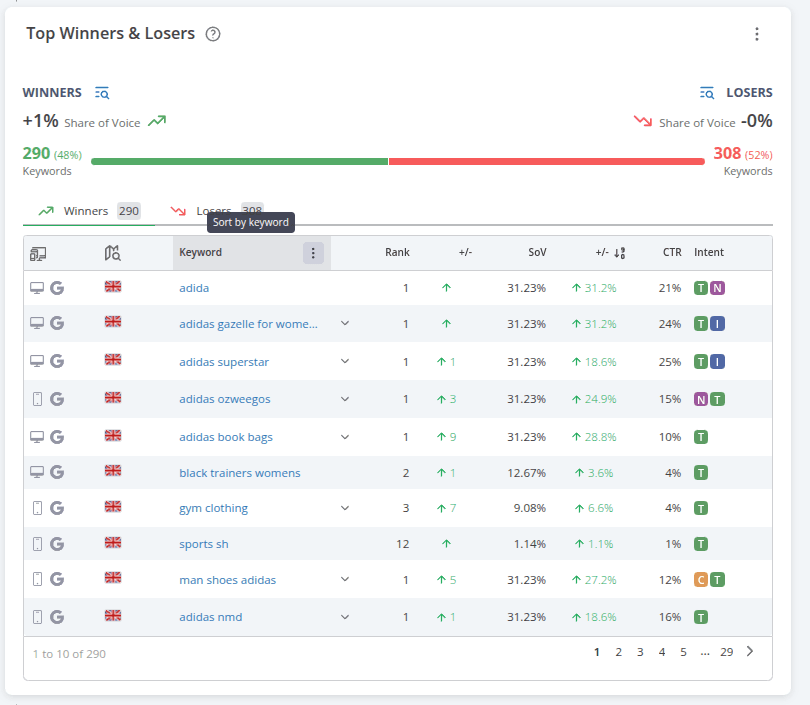
The Winners & Losers widget displays some keywords from each group directly in the table. To see all keywords within a group, click the icon next to the Winners/Losers headlines. AccuRanker will open the Keywords tab and show the keywords from that group.
Winners & Losers also shows how much your Share of Voice has increased or decreased over the selected comparison period.
Which Keywords Are Included?
For a keyword to be included in the Winners & Losers comparison, it must have been tracked on both dates that you compare.
This ensures that AccuRanker can compare the keyword's ranking between the two selected dates.
How to Change the Comparison Dates
To choose which dates you want to compare:
- Find Comparing data to in the upper-right corner of the app.
- Select the date you want to compare with your current data.
The Winners & Losers data will reflect the selected comparison period.
Related help guides
How to Compare Historical Data
How to Set Up Notifications
Share of Voice
Still need help?
Customer support
Our live support team is ready to assist you with any issues.