

Introducing AccuRanker’s Unified Filtering Experience

Peter Emil Tybirk
June 9, 2026
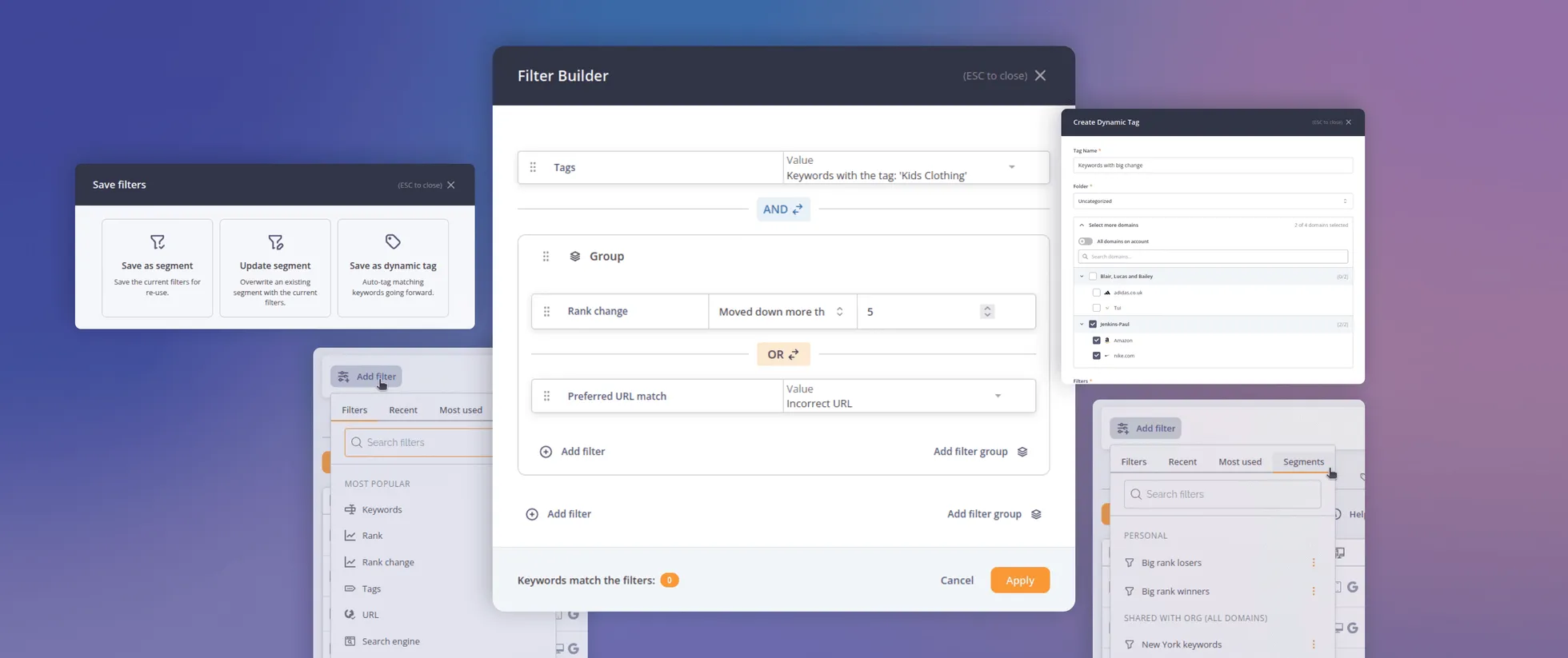
AccuRanker's unified filtering experience brings the filter bar, dynamic tags, saved segments, and the API into a shared filtering engine.
This release brings the filter bar, dynamic tags, saved segments, and the API onto a single, shared filtering engine. The powerful logic you already loved is now consistent across the application - the same language, the same results, whether you are filtering a keyword list, building a dynamic tag, or calling the API.
In addition, we have brought filters to new levels of aggregation, allowing you to do deeper analysis on the domain level. Here is what is new and what it lets you do.
One Filter System, with Real AND/OR Logic
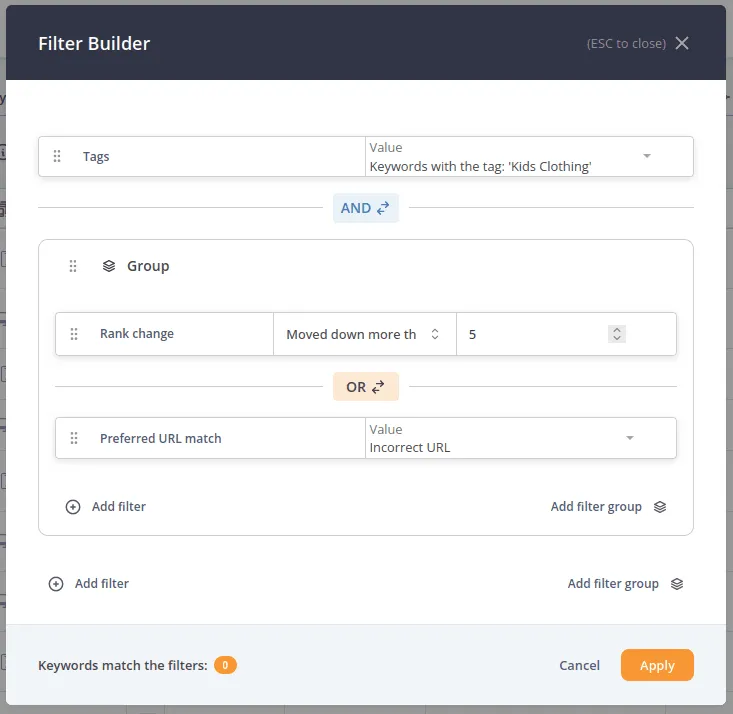
The filter bar now speaks the same language as dynamic tags. That means nested groups with AND/OR logic, built right into the bar. You can now compose questions like a sentence:
- Keywords containing "seo" AND (rank 1–3 OR search volume > 10,000)
- Search intent is "transactional" AND *(there is no ads OR search volume > 10,000).
Each group has its own AND/OR toggle. You can nest groups inside groups and drag and drop individual rules to reorder them or move them between groups.
In other words, you can now slice and dice your data exactly as you like.
Filters Everywhere, Including the Overviews
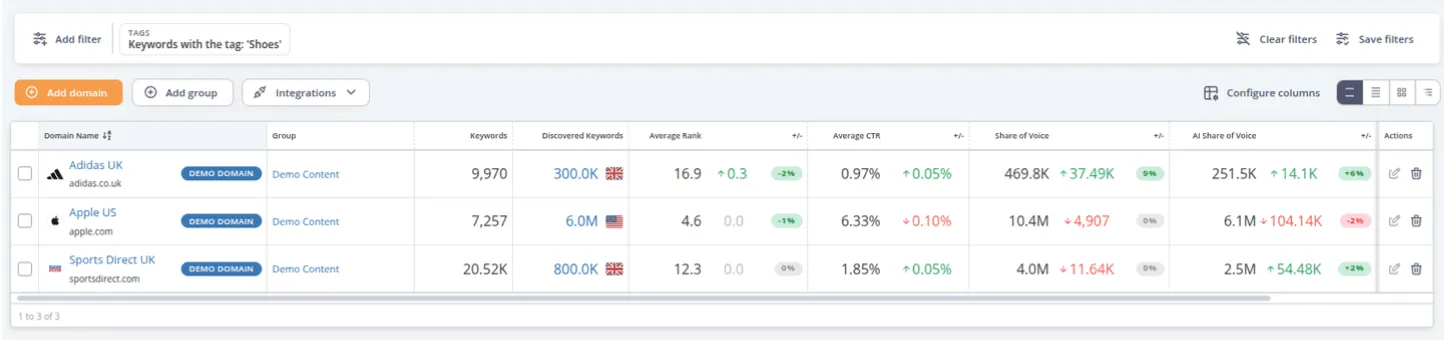
Some of the best questions are about your whole portfolio, not a single AccuRanker domain. And now, the full keyword-level filter set works right on the Domains overview (/app/domains/): Search Volume, Rank, Tags, Folders, Country/Locale, Search Engine, Share of Voice, Traffic Value, CTR, Search Intent, etc.
It is about more than narrowing down which domains you see. Because you are filtering on keyword-level conditions across all domains at once, the overview becomes a way to compare performance and trends across domains.
Let us say you run the tag "Shoes" across a dozen domains that span different countries and languages. From the Domains overview, you can now line them all up and ask how that slice of keywords is performing in each market - which countries are winning on "Shoes", which are slipping, all in one view, without opening a single keyword list.
These new filters unlock answering questions like:
- "How do my 'Shoes' keywords rank across every country domain?"
- "Which domains have the most keywords that fell out of the top 10?"
- "How is my performance in New York across all my domains?"
The same idea extends to AccuLLM and the Brands overview (/app/llm/brands/), which now accepts the full prompt-level filter set — LLM Rank, Visibility, Visibility change, Tags, Folders, and more. Thus, you can compare prompts across brands and ask:
- "How does the performance across my brands compare on ChatGPT."
- "All brands’ performance in AI answers for prompts tagged 'competitor comparison'."
Card and Tree views support these filters too, so the experience is consistent whether you are looking at a flat list or a hierarchy.
A Smarter Add Filter Popover
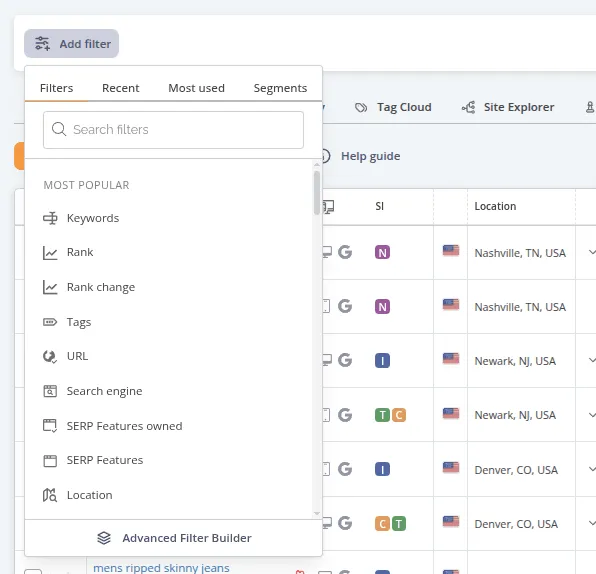
Finding the right filter used to mean scanning a long flat list. The new Add Filter popover is organized and searchable, with tabs that put everything one click away:
- Filters: Browse or search, neatly grouped into categories
- Recent: The filters you applied most recently (in the current context, e.g., on a specific domain)
- Most used: The filters you reach for again and again (in the current context, e.g., on a specific domain)
- Segments: Your saved segments, ready to drop in.
The most relevant filters for each page are surfaced as "Most popular" featured filters right at the top.
Dynamic Tags and Filters, Finally at Parity
Dynamic tags now speak the same language as the filter bar. Any keyword filter you can use in the bar, you can now use as a dynamic-tag rule - with the same nested AND/OR groups, the same comparators, the same everything - full parity across the keyword filter set.
We also added the obvious shortcut everyone wanted: Save as dynamic tag straight from the filter bar. Dial in exactly the filters you want, click “Save”, choose "Save as dynamic tag", and your current rules and domain context pre-fill the tag creation modal for you. The keywords you are looking at right now become a tag that keeps applying itself going forward - no rebuilding the logic from scratch.

Managing tags across a large portfolio also got easier:
- Bulk create dynamic tags across many domains at once, using a new Grouped Domain Picker that lets you expand groups and check off exactly the domains you want.
- Bulk edit a tag's rules across every domain the tag is deployed on - in a single modal.
For agencies and in-house teams running dozens or hundreds of domains, hours of repetitive clicking are now a thing of the past.
Saved Segments, Supercharged
Saving a set of filters for re-use is now integrated even better across the platform. Segments now have a dedicated home and got a serious upgrade. Save your filters once, reuse them everywhere, and decide exactly who else can use them, via four scope types:
- Personal: Just you.
- All domains: Shared across your whole organization.
- Specific domains: Appears only when those domains are in scope.
- Specific groups: Appears only when those groups are in scope.
A few more noteworthy things regarding segments:
- Segment scope: Segments "live" on the level of aggregation at which they are defined. For instance, if you create a segment on the Domains overview, it will appear only here, but not "inside the individual domains" - such segments could, for instance, carry a domains filter, which enables you to quickly narrow down your domain list to those domains. On the other hand, if you create a segment from within the keyword list, it will appear on all tabs inside the domain, e.g., Tag Cloud, Landing Pages, and Dashboard.
- Sticky compare period: Each segment remembers its own comparison window, so a segment like "rank change > 5" always compares against the right period, not whatever happened to be in the bar last.
- Promote and demote: The segment's creator can promote a personal segment to a shared scope, or pull it back to personal.
- Per-row actions on every segment: Edit, Duplicate, Update from current filters, and Delete.
And because segments live on the shared engine, they can use the full nested filter logic too - and they are fully accessible via the API.
All Available Programmatically, Too
The very same filter engine powers the AccuRanker REST API, so anything you can build in the UI, you can build in code. POST your filters as JSON, nested, with AND/OR and a rich set of comparators: eq, ne, gt/gte, lt/lte, between, contains, starts_with, regex, any/all/none, empty, and more.
Discover the full catalog of available filters anytime at GET /api/v4/filters/. And you do not have to rebuild your segments in code either — apply a saved one by id (?segment_id=…), you find the id on the segments page (/app/segments). Learn more in the API documentation.
How to Get Started
It is rolling out now, no setup required. Here is where to look:
- Open the new Add Filter popover on Keywords, Domains, or any list page, and explore the tabs.
- Build a nested filter with AND/OR groups, then drag rules around to fine-tune it.
- Click “Save” to keep it as a segment (and pick who to share it with), or Save as dynamic tag to auto-tag matching keywords going forward.
- Head to the Segments tab to browse, edit, and reuse everything you have saved.
- Try a filter on the Domains or Brands overview.
One filtering language, everywhere you work - in the filter bar, in your tags, in your saved segments, and in the API.
Related blog posts

5 Alerts You Should Set Up with AccuRanker MCP
Set up SEO alerts with AccuRanker MCP and let your AI assistant monitor ranks and AI visibility, so you can skip the manual checks.
3 September 2026
Spending Hours Gathering SEO Data? Here Is How to Fix It
AccuRanker MCP is your shortcut to faster SEO analysis. It eliminates the time you spend gathering data, so you can focus on actual SEO work.
20 August 2026
How SERP Layout Is Killing Your Organic Traffic
Why is your rank 1 not driving traffic? Learn how to measure real SERP visibility with pixel position, SERP feature tracking, and dynamic CTR.
13 August 2026